We’ve made several updates to the RunSafe Security Platform in September and October, including new Jenkins support, better visibility into software components and license compliance across organizations, new ways to track changes between builds, and more complete SBOM data. We’ve also expanded support for embedded development environments in RunSafe Identify and RunSafe Protect.
Here’s what’s new:
RunSafe Security Platform
- Jenkins CI support
- New builds UI with SBOM and vulnerability comparisons between builds
- Organization-wide component visibility and license compliance reporting
- Expanded SBOM enrichment for more complete component data
- Improved subcomponent visibility within SBOMs
- Faster dashboard loading and table rendering
RunSafe Identify
- Improved CycloneDX reporting and copyright information
- Expanded Green Hills compiler support on Windows
- Improved Windows handling and reliability
RunSafe Protect
- ThreadX support
RunSafe Security Platform Adds Jenkins Support
The RunSafe Security Platform now supports Jenkins, expanding our CI/CD integration options for teams that build and release software through Jenkins pipelines.
Teams can incorporate RunSafe into their existing Jenkins workflows and bring SBOM and vulnerability data into the platform for analysis and management. For embedded software teams already using Jenkins to automate builds, this provides a way to add software component visibility to established development processes without switching CI/CD tools.
Track SBOM and Vulnerability Changes Between Builds
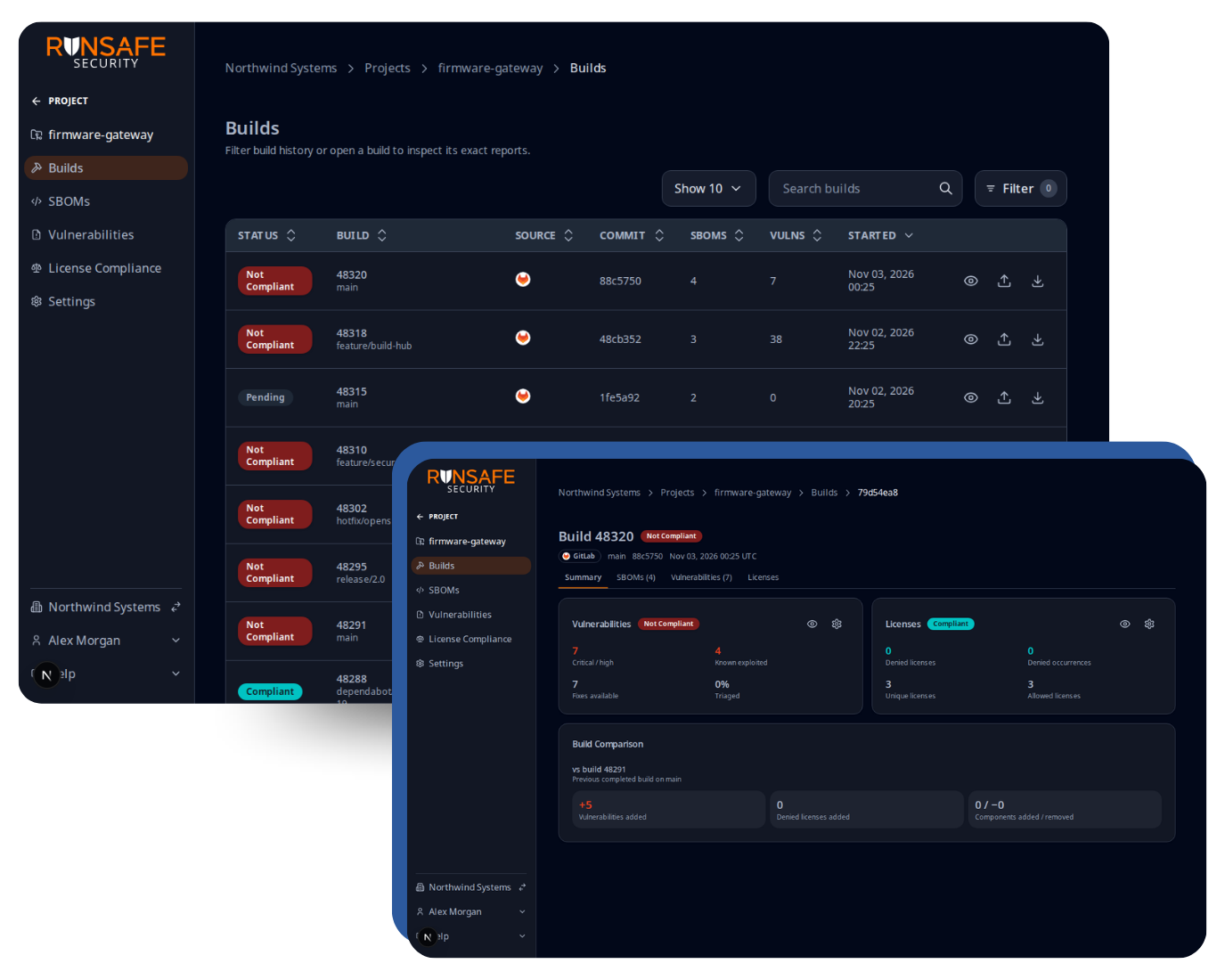
We’ve introduced a new builds UI in the RunSafe Security Platform, making it easier to organize Software Bills of Materials (SBOMs) and understand how your software changes from one build to the next.
Previously, SBOMs generated during a pipeline run appeared as individual reports. Now, the builds UI groups related SBOMs together so you can see which SBOMs were produced by a specific GitHub Actions or GitLab pipeline run.
The new build comparison functionality also allows teams to track changes between builds, including:
- Component changes: See which software components or dependencies were added or removed.
- Version changes: Identify changes in component versions between builds.
- Vulnerability changes: Compare vulnerability counts to see whether new vulnerabilities have been introduced or existing ones have been addressed.
These comparisons make it easier to understand how software composition and vulnerability exposure evolve with each build, helping teams identify unexpected dependencies and investigate changes before deployment.
Organization-Wide Component and License Compliance Visibility
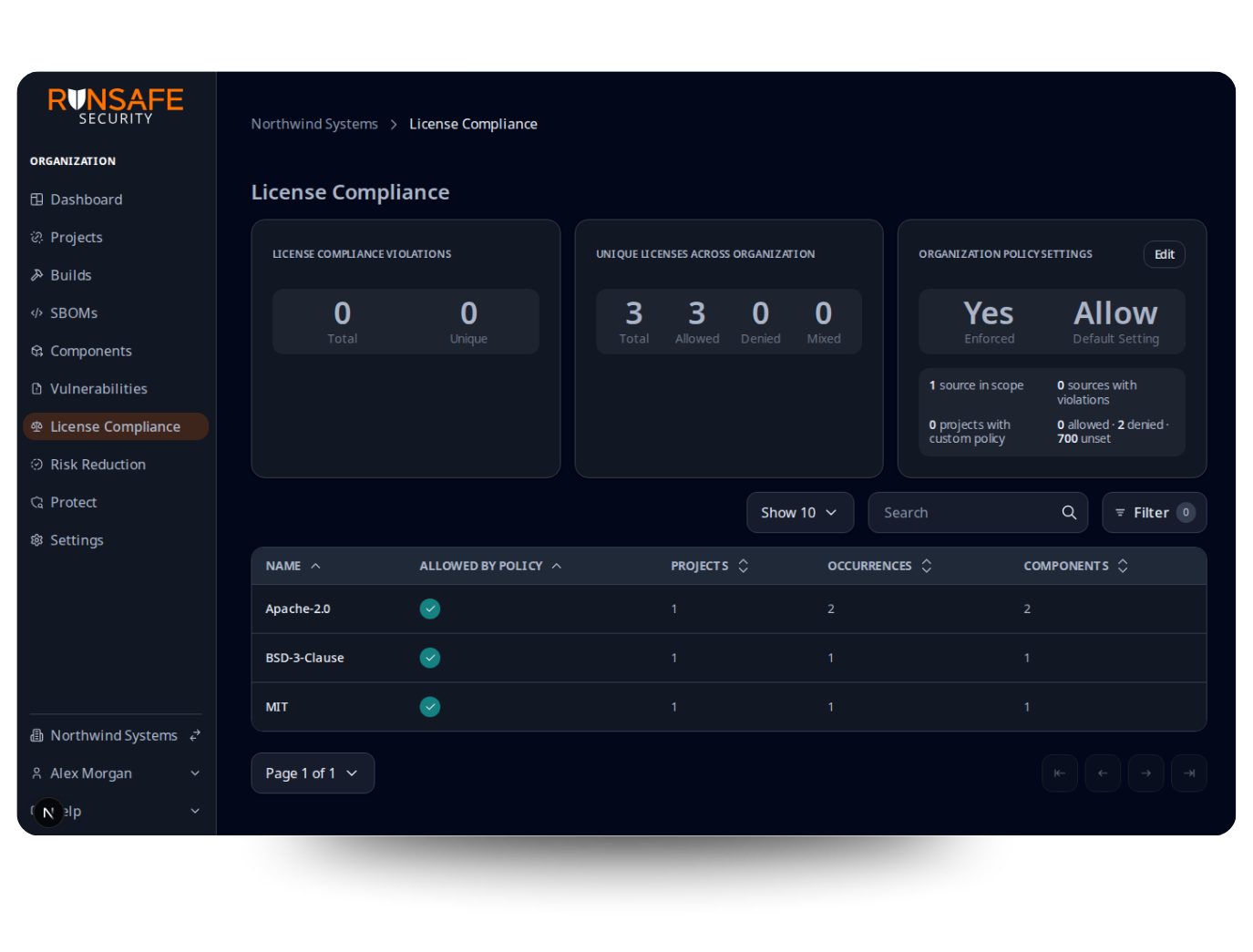
We’ve expanded the RunSafe Security Platform’s reporting capabilities with new organization-wide views for software components and license compliance.
Organization-Wide Component Visibility
The new organization components page gives teams a centralized view of software components across their projects. For example, if you need to determine where a particular version of OpenSSL or Log4j is used, you can now find that information across your organization at a glance.
This makes it easier to locate dependencies, understand where components are being used, and investigate exposure when new vulnerabilities are disclosed.
Organization-Wide License Compliance
We’ve also expanded license compliance reporting from individual projects to the organization level. Teams can now see which software licenses are present across their organization and identify license compliance violations in one place.
This provides a broader view of open-source license exposure and makes it easier to manage compliance across multiple projects.
Expanded SBOM Enrichment Improves Component Data Quality
We’ve continued improving the RunSafe Security Platform’s SBOM enrichment capabilities to deliver more complete and accurate component information.
The platform can now backfill missing version and license information when processing SBOMs, including externally generated SBOMs uploaded for analysis.
By filling in missing component details, RunSafe helps improve the quality of SBOM data used for vulnerability identification and license compliance. These improvements build on our existing SBOM enrichment capabilities, helping teams work with more complete component information without manually updating every missing field.
Improved Visibility into SBOM Subcomponents
We’ve updated how the platform displays subcomponents within software packages, making it easier to understand relationships between parent packages and their underlying components.
For example, when a software project includes OpenSSL, users can now more easily explore the components contained within that package. This additional visibility helps teams better understand which functionality is included in their software and investigate whether reported vulnerabilities are applicable to specific components.
The updated interface makes complex SBOMs easier to navigate, particularly for projects with nested dependencies and multiple component relationships.
Faster Dashboard and Report Loading
We’ve made significant performance improvements to dashboard views and table rendering within the RunSafe Security Platform. Customers managing large numbers of SBOMs will see faster page loading and more responsive reporting, making it easier to navigate and analyze software component and vulnerability data across large projects.
RunSafe Identify Improves CycloneDX Reporting and SBOM Accuracy
We’ve made several improvements to RunSafe Identify to deliver more complete component metadata and better alignment with the CycloneDX SBOM specification.
One of the key improvements is enhanced copyright information handling and parsing. RunSafe Identify can more effectively extract and report copyright and authorship information from source code, improving the quality of metadata included in generated SBOMs.
We’ve also refined how component information is represented to better conform to CycloneDX requirements. These enhancements help teams generate higher-quality SBOMs with more consistent metadata for software transparency, compliance, and vulnerability management.
Expanded Green Hills Compiler Support on Windows
RunSafe Identify has successfully validated SBOM generation with Green Hills compiler environments on Windows, expanding on our existing support for Green Hills on Linux.
This capability has been demonstrated using specific configuration settings, giving teams working with Green Hills development tools another option for generating SBOMs within their Windows-based development workflows.
We’ve also resolved several Windows-specific edge cases to improve the stability and reliability of SBOM generation across different build environments.
RunSafe Protect Adds ThreadX Support
RunSafe Protect now supports ThreadX, extending our runtime code protection capabilities to another embedded operating system environment.
With ThreadX support, organizations building embedded systems on this RTOS can take advantage of RunSafe’s Load-time Function Randomization (LFR) technology to help mitigate memory-based exploitation attempts.
This addition continues our expansion of runtime memory protection across embedded platforms, helping organizations strengthen the security and resilience of long-lived, mission-critical software.
If you’d like to learn more about these updates or see them in action, reach out to your RunSafe Security contact. Schedule time with our team here.